Jun 19, 2013

HTTPTimeOutException in ASP.net application

ASP.net application will throw HttpTimeOutException, if it’s request executing more than 100 seconds.

If you need execution time more than that, set following setting in web.config file.

<system.web>
<!-- in seconds-->
<httpRuntime executionTimeout="300"/>
</system.web>

Feb 11, 2013

Convert a Double to String : M3

Since M3 java code is similar to RPG and use MvxString rather than String, here it is the code to convert/format numeric value to alpha value in M3.

   1:  this.PXNUM = dSUM;
   2:  this.PXALPH.clear();
   3:  SRCOMNUM.COMNUM();
   4:  WQT[tempIdx].moveRight(this.PXALPH);


In line number:


1. assign double value which is to be converted.
2. clear any previous value of PXALPH.
3. actual conversion . The SRCCOMNUM is an object of cSRCOMNUM class declared in mvx.app.util
4. gets converted alphanumeric value.


Let, dSUM= 38.05580 and if we want


  • to display dSUM with 2 decimal:

   1:  this.PXNUM = dSUM; 
   2:  this.PXALPH.clear();   
   3:  this.PXDCCD = 2; // setting number of decimals.
   4:  SRCOMNUM.COMNUM(); 
   5:  WQT[tempIdx].moveRight(this.PXALPH);


Output> 38.05


  • to display negative value: Here we have a option, to which character to be used for negative representations. (i.e. –38.05, (38.55), 38.05- etc)

   1:  this.PXNUM = dSUM; 
   2:  this.PXALPH.clear();   
   3:  this.PXDCCD = 2; 
   4:  SRCOMNUM.PXPNVB='('; // Left character if negative
   5:  SRCOMNUM.PXPNVA=')'; // Right character if negative
   6:  SRCOMNUM.COMNUM(); 
   7:  WQT[tempIdx].moveRight(this.PXALPH);


Output> (38.05)

Jan 24, 2013

Move to Movex (M3)

From 2012-12-10, I’ve engaged with M3 , development. Now, I’m playing Senior Technical Lead role.  But I’m still interesting .net development which is my core strength.

What is M3

It is an ERP (Enterprise Resource Planning) solution for, specially, the fashion industry known as Movex. Originally it was developed by Intentia, a Sweden company and somewhere around 2008 it was acquired by Lawson. In late 2012, Infor1 has acquired M3.

Technology

To discuss about the technology, it will take pages. In this post, I’m only going to talks about briefly.

  1. M3BE (M3 Business Engine) is the core component in M3. It is Java. It’s encapsulates ERP functionalities and Data Access Layer. Main data base is DB2, but new versions supports multiple data sources, including MS SQL server.
  2. ISO (Infor Smart Office)- is the front end for the users and client based application. It is WPF  (Microsoft Presentation Foundation) client application.

ISOFigure 1: Infor Smart Office

Mar 22, 2012

Enable PING in Windows 2008 R2

In MS Windows 2008R2 ping command dose not working unless you configure the inbound rule in Windows Firewall.

Steps

  1. “Start” –> “Administrative Tools” –> “Windows Firewall with Advanced Security”
  2. “Inbound Rules”-> “New Rule”
  3. image
  4. image
  5. Select “Allow the connection” –> [Finish].

Oct 31, 2011

Enterprise Single Sign-On Service Error:0x80131700

ESSO service cannot start and giving  error message,
Windows could not start the Enterprise Single Sign-On Service service on 
Local Computer.
Error 0x80131700: 0x80131700 


This is happens after installing .net 4.0 framework. This is known known issue and there is a hotfix to install.

The URL* is, Update for Microsoft Enterprise Single Sign-On v4 (KB2252691)


* last access: 2011-10-31 11:45AM

For more details
http://support.microsoft.com/kb/2252691

Oct 27, 2011

MS SQL Server Backups & Restore: Steps explained

Yes I know, there are lots of articles and posts about this topic. But I want to show, what are things to be known to recover the database to specific point-in-time.

Backup

As you know there are 3 recovery models supported in MS SQL server.
  1. Simple
    • Automatically clear the log file.
    • Only allows  recover to end of a backup.
    • No log backups
  2. Full
    • Requires log backups
    • No work is lost, if data (.mdf) file get damaged/lost
    • Can recover to a specific point-in-time.
  3. Bulk-logged
    • Requires log backups
    • Use minimal logging for bulk operations, thereby reducing the log space
    • Point-in-time recovery is not supported.
In a mission critical environment, Full recovery model is the most recommended. In this post I’m paying attention to this model and simply explain point-in-time recovery.
From your SQL server database you can take, 3 back up types.
  1. Full
  2. Differential
  3. Transaction Log
In Full recovery model, applicability of above types can be depicted in following way.
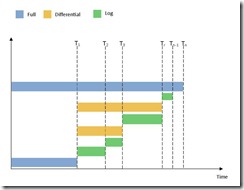
SQL Backup life cycle
Figure 1
You can see in the Figure 1, Full backup will take all the data from start to the end(let say T1). On the other hand Differential backup will take care of data from last successful Full backup(always) to the end. Whereas, Transaction Log back up will incrementally takes data in subsequent attempts from where the last successful transaction log was taken to the end of the log.  By considering this you can create a backup strategy for your database. It has to be more serious when you are dealing with large and mission critical database. In a little later, I will explaining about restoring of database which will helps you to design the backup strategy.
Here is the T-SQL statements for

Oct 20, 2011

DUMP TRAN <Dbname> WITH TRUNCATE_ONLY & MSSQL 2008

To Shrink the database log file I’ve used to,
   1:  
   2: DUMP TRAN <DatabaseName> WITH TRUNCATE_ONLY
   3: GO
   4:  
   5: USE <DatabaseName>
   6: DBCC SHRINKFILE (<DatabaseName>_log, 100);
   7: GO
   8:  


This is not work in SQL 2008, as DUMP is discontinued. Otherwise we have to use BACKUP.

To shrink the log file in SQL 2008,
  1. Back up the database in “SIMPLE” recovery mode.
  2. then run above line no 6.

Refer this (http://msdn.microsoft.com/en-us/library/ms144262.aspx) for discontinued functionalities in SQL 2008.

MEC: How to Set Message Counter for EDI Message

When you sending/creating EDI messages it is necessary to include unique message interchange number. This is to ensure each message that we ...