Jan 20, 2011

Movex Class Builder v2.0

I released Movex Class Builder v 2.0 after 2+ yrs from its initial release.

New Features:

  1. It is showing connected IP and Port. You can change the setting and re-connect the same time. No need to close-and-reopen the Class Builder.

     image5
  2. Checking API Layout.
    This enable us to check consistency in C# class API layout and current Movex API layout.

    image10 

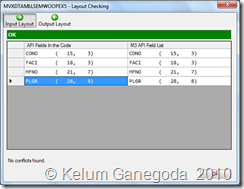
    By clicking on this option, it will search currently connected API is in opened project, it does show the summary dialog box.

    image
    Figure: C# Class and M3 API layout is exactly matched.

    image
    Figure: Having conflicts in the code
Dec 22, 2010

RANK() and alternate Sub Query in T-SQL

Consider, we have data table called Orders_Header which hold order header details.
Table
As you can see, PO number(PONo)  ‘0050426995’ is duplicating. Because this table containing PO amendments too. If you notice, DownloadData is in order, meaning first version of PO received on 2010-06-26 17:07:04.910, rest of them subsequently.
The requirement is we want to get following output.
output
Normally we can write a sub query for this and get the output.
SELECT PONo,
(
SELECT COUNT(PONo)+1 -- to omit zero
FROM ORDERS_Header WHERE PONo=oh.PONo AND DownloadDate< oh.DownloadDate
) AS Revision,
DownloadDate
FROM ORDERS_Header oh
ORDER BY PONO,DownloadDate

By running this query, you can see the following Actual Execution Plan.

Sub_plan


From MS-SQL 2005 onwards this can be easily achieved by RANK() function. 


SElECT PONo, 
RANK() OVER(PARTITION BY PONo ORDER BY DownloadDate) AS Revision ,DownloadDate 
FROM dbo.ORDERS_Header
ORDER BY PONO,DownloadDate


Check its Actual Execution Plan and note the difference.

Rank_plan

Dec 1, 2010

Movex Tech Training from Lawson

My current employer (Brandix Lanka) arranged a MoveX technical training from Lawson, our ERP vendor. It took 12 days and today is the last day.

Mr. Daniel Rodrigo Olea , EMEA Technical Project Manager of Lawson software is the presenter and delivered marvelous sessions to our team. Daniel Rodrigo Olea

Very first day, we were totally blank of what he is talking about. But he guided us in a way that we were able to understand almost everything in Movex code.


Areas that we covered in the training,

  1. MAK tool
  2. Creating/modifying Movex Program
  3. Creating/modifying View Definition
  4. Creating/modifying M3 API
  5. Managing Out Interface
  6. Data tables, Data Structures, CL in M3
  7. Lawson web services to interact with M3 programs and APIs.
  8. and much more…

Oct 14, 2010

Windows Could Not Start Enterprise Single Sign-On Service

In Windows 7 development machine, suddenly I got following error  when starting the ESSO service.

Windows could not start the Enterprise Single Sign-On Service
service on Local Computer
Error 0x80131700: 0x80131700

If check the windows event viewer, we can see,

Could not create SSOSQL. To fix the problem, reinstall SSO or try 'regasm SSOSQL.dll' from a Visual Studio command prompt.
Error Code: 0x80131700

I ran “regasm” and it is worked.

Oct 1, 2010

Brandix B2B (EDI) Implementation

This project was totally new to me. I knew about EDI, but no experiences in the past. But I took the challenge and did our own researches over 2 months and implemented within 6 months. We used Microsoft BizTalk Server 2006 R2 to implement this.

Abstract of the project

Our(Brandix*) one of leading buyer(Mark And Spencer) wanted to implement Business-to-Business (B2B) application with us.So that they can raise their purchase orders and receive invoices electronically. Within 48 hours we will receive invoices status,E.g. Invoice Processing Successful, automatically. 

Architecture

  • Download Purchase Orders
  1. Buyer raises the purchase order through a trading partner.
  2. Our EDI system subscribes that PO.
  3. Process in BizTalk server and immediately send email notification to the relevant merchandiser.
    Download Purchase Orders
  • Upload Invoices
  1. Invoices been processed from our logistic system and upload them to the EDI system (BizTalk server/SQL server)
  2. Make the EDI file based on the given EDI specification inside the BizTalk server.
  3. Upload to the trading partner.
    Upload Invoices

Props & Cons

  1. Implementation cost is bit higher
  2. Reduce paper works
  3. Minimal data entry, hence time saving 
  4. Seamless business process


* Brandix is the FIRST Sri Lankan company using Ms-BizTalk server for B2B integration in Sri Lanka.

Aug 27, 2010

The status code returned from the server was 12029

Figure 1: Ajax exception
This error code coming from Microsoft Win32 Internet (WinInet) API, which provides abstracts the protocols into high level interface.

12029       ERROR_INTERNET_CANNOT_CONNECT
               The attempt to connect to the server failed.


Useful links:
  1. http://forums.asp.net/t/1129622.aspx
  2. http://support.microsoft.com/kb/193625

Aug 26, 2010

BizTalk Event Log error: The source was not found, but some or all event logs could not be searched.

My BizTalk development machine runs on Windows 7. In an orchestration I've wrote
System.Diagnostics.EventLog.WriteEntry("Payment Automation","Instantiated the Process Engine");

When it runs, i can see following error in the event log. But I wont get this in Windows 2003 R2 server.

Figure 1: Windows Event Log

Event Type: Error
Event Source: XLANG/s
Event Category: None
Event ID: 10034
Date:  8/26/2010
Time:  9:27:29 AM
User:  N/A
Computer: 
Description:
Uncaught exception (see the 'inner exception' below) has suspended an instance of service 'Brandix.EAI.Orchestration.PaymentAutomation.BrandixPaymentAutomation(7e9e7bc9-558e-8988-7478-6552f648a021)'.
The service instance will remain suspended until administratively resumed or terminated. 
If resumed the instance will continue from its last persisted state and may re-throw the same unexpected exception.
InstanceId: b4472198-88f8-458f-aee3-aaa272d327ee
Shape name: Event Log Entry
ShapeId: 33391213-fc37-4d3a-91d7-f5f7bd50b667
Exception thrown from: segment 3, progress 3
Inner exception: The source was not found, but some or all event logs could not be searched.  Inaccessible logs: Security.
        
Exception type: SecurityException
Source: System
Target Site: Microsoft.Win32.RegistryKey FindSourceRegistration(System.String, System.String, Boolean)
The following is a stack trace that identifies the location where the exception occured

To avoid this error we have to do following steps.
  1. Run RegEdit.exe
  2. Expand hives to the level of following
    Computer\HKEY_LOCAL_MACHINE\SYSTEM\CurrentControlSet\services\EventLog\Application
  3. Insert a new key to the Application hive, in this case "Payment Automation"
  4. Insert a new String Value called "EventMessageFile" under the "Payment Automation"
  5. Double click on "EventMessageFile" set Value Data as "C:\Windows\Microsoft.NET\Framework\v2.0.50727\EventLogMessages.dll"
Final windows registry editor will look like this,

Figure 2: Windows Registry Editor

MEC: How to Set Message Counter for EDI Message

When you sending/creating EDI messages it is necessary to include unique message interchange number. This is to ensure each message that we ...